
The document aggregator lets you insert the rows of one document into another, either summing the rows or grouping the whole document into a single row.
In the aggregation editor you define which fields are used to manage the merge. This function is only available with Cloud and Pro licenses. When aggregation is enabled, the dedicated section appears in the record. Click Set to open the management window.
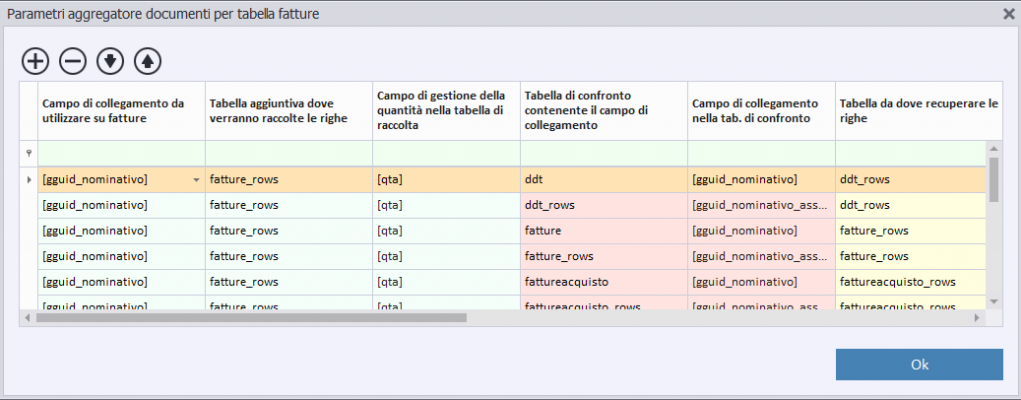
Link field to use on (table name)
The field that links the two documents and lets them be aggregated.
Additional table where the rows will be collected
The documents' additional table that collects the rows; its name is always table_rows.
Quantity field in the collecting table
The field that manages the quantity in the table collecting the rows.
Comparison table containing the link field
The table you want to aggregate from.
Link field in the comparison table
The field linking the two documents in the comparison table.
Rows table to retrieve the rows from
The additional table of the comparison table from which the rows are retrieved.
Optional additional SQL filter for retrieving the rows
Can be set to filter the data further.
Quantity field in the source table
The field that manages the quantity in the rows table of the comparison table.
Collecting table field for the description when merging rows
The description field of the collecting table.
Mappings for merging rows
The mappings for merging document rows. Fields from comparisontable_rows: the fields of the comparison table to be mapped. Fields to tablename_rows: the fields of the table receiving the mapping. Sum: tick if the fields must be summed. No Different: tick if the fields must not be summed.
Mappings
The mappings to retrieve from the table.
Table for choosing the archive on confirmation
Documents can be archived after being aggregated. This is the table for choosing the archive when confirming.
Archive to use on document confirmation
The archive where documents are kept after being aggregated.