
Web services let Nios4 interact with other applications, regardless of the operating system they run on and the programming language they use.
An application that wants to read and write data directly in Nios4 must make internet calls over the HTTPS protocol, following the formatting rules.
Keep in mind that to work correctly you need valid credentials for a D-One account and an active cloud database.
From this link you can try the API directly. From this link you can download the OpenAPI file
Nios4 synchronizer Python project
How it works
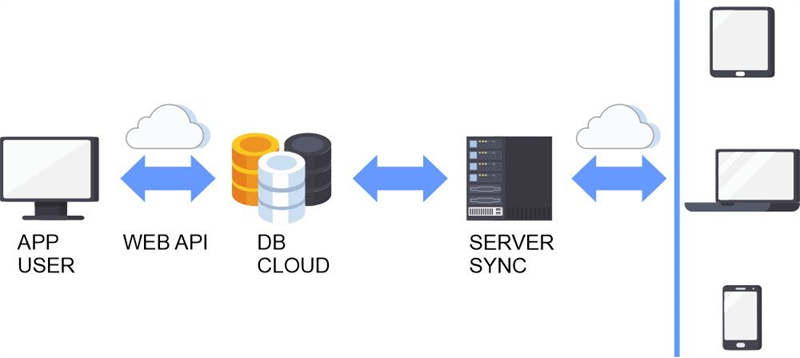
Starting from their management software or application, the user communicates directly with the cloud database through the web API.
The cloud database is connected to the server that manages the synchronization of information between the various clients. This means only the data actually changed is sent each time.
That is why, after changing the data in the cloud database, it is important to also send the synchronization command (sync) so the changes are distributed to all connected devices.
Below are the main calls you can use.
action
The definition of the main call.
user_login
Logs in and retrieves the user’s data.
user_logout
Logs the user out.
database_list
Retrieves the list of databases the user can access.
table_list
Retrieves the list of tables in a specific database.
table_info
Retrieves all the properties and characteristics of a specific table.
model
Retrieves all the records in a specific table.
table_save
Adds, edits or deletes records in a specific table.
sync
Forces the cloud database to synchronize with the synchronization server.
users
Retrieves the users linked to the requested database.