
This function is designed to guarantee maximum security for the sensitive data stored on the D-One servers, by encrypting it and making it inaccessible in any way. The data is visible in clear text only in the Windows, Android, iOS and macOS clients, to the users who have entered the decryption key on those devices.
This means the Web version, which is hosted directly on the D-One servers, does NOT let you view this data in clear text, so it is not recommended for databases with encrypted data.
Steps to encrypt text fields
- Open the Windows Desktop version of the program
- Go to the Options and then to the Fields section
- Select the field to encrypt
- Enable encryption.
Please note
Only text fields can be encrypted, i.e. fields of type List, Notes and Text.
When you tick encryption and save the field, if the key has never been entered (the key is unique for the whole database), the system offers to create a new key, which is shown so you can save it and keep it safe.
Viewing and editing encrypted data
Access to encrypted data: only users with the encryption key can view the data in clear text.
Restrictions for other users: users without the encryption key cannot view, write or modify encrypted fields.
Adding new data: to enter data in forms that contain encrypted fields, you must first enter the decryption key. The program encrypts new data automatically, but it needs the key to do so: users who don’t have the key, or haven’t entered it, cannot enter data in encrypted fields.
Using the Nios4 mobile app
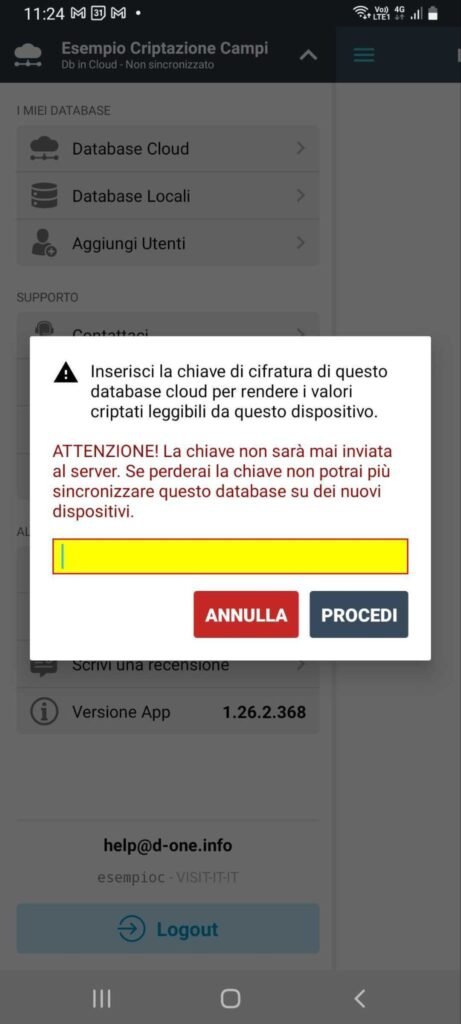
Text field encryption is also supported in the Nios4 mobile apps, as shown in the screenshot below.
Conclusion
Encrypting text fields in Nios4 is a strongly recommended feature for keeping sensitive data safe, and in practice a required one if you don’t want this data to be visible on the D-One servers. It guarantees maximum security of the data stored on the D-One servers, which are encrypted and not accessible in any way. This ensures that D-One never comes into contact with sensitive data.