
The Nios4 platform is designed to be used even when you can’t connect to the internet. The system always keeps a local copy of all the database data, and synchronizes the modified data with the central server only when an internet connection is available. The data then becomes available to the other devices during their own synchronization.
Basics
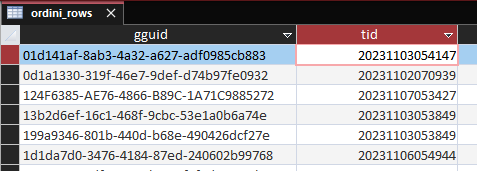
Data synchronization is handled through two specific fields present in every table of the database. These fields are GGUID and TID.
The first field, GGUID, is the record’s globally unique identifier. It is normally a 32-character alphanumeric value generated automatically by the devices, but it can be any text value. What matters is that the value is never repeated in the whole database and that it is at least 10 alphanumeric characters long. So two tables, even though their data is separate, can’t have two records identified by the same GGUID.
The TID field is a numeric value identifying the record’s last modification (or its creation date). It is written in the format YYYYMMDDhhmmss, so for example the date and time 5 November 2023 16:11 becomes 20231105161100. Using this value, during synchronization the server decides whether the record is more recent than the one possibly already in the cloud, and should therefore be distributed to the other devices, or whether it must be replaced because its timestamp is earlier than the server’s.
Manual synchronization management in the Windows versions
All versions of the Nios4 programs handle all synchronization operations automatically. However, with the Windows version, working directly on the local database (Microsoft Access or SQL Server), you can simulate the operations needed to force the system to synchronize a specific record. This method is normally used when you want to insert data from another management software directly into the Nios4 database, or from the daemon program, and then send it to the cloud and therefore to the other connected devices.
There are two operations to perform:
The first is to change the value of the TID field on the record concerned. Remember to follow the format described above and to use the UTC time zone (+0 hours).
The second operation is to insert a new row in the lo_syncbox table with the table name, the record’s gguid and the type of operation to perform, in this case always the value 0.

Once synchronization has run, manually through the program or automatically through the other programs (Daemon, Trigger), the table is emptied automatically.