
Calculation expressions tell the program which calculations to perform on the table. Calculations are always run in sequence, so it’s important to set their order correctly.
Expressions run every time one of the fields they contain is modified. In any case, expressions only work within the current record and its additional tables, if any.
To manage the expressions, click Set to open the dedicated screen.
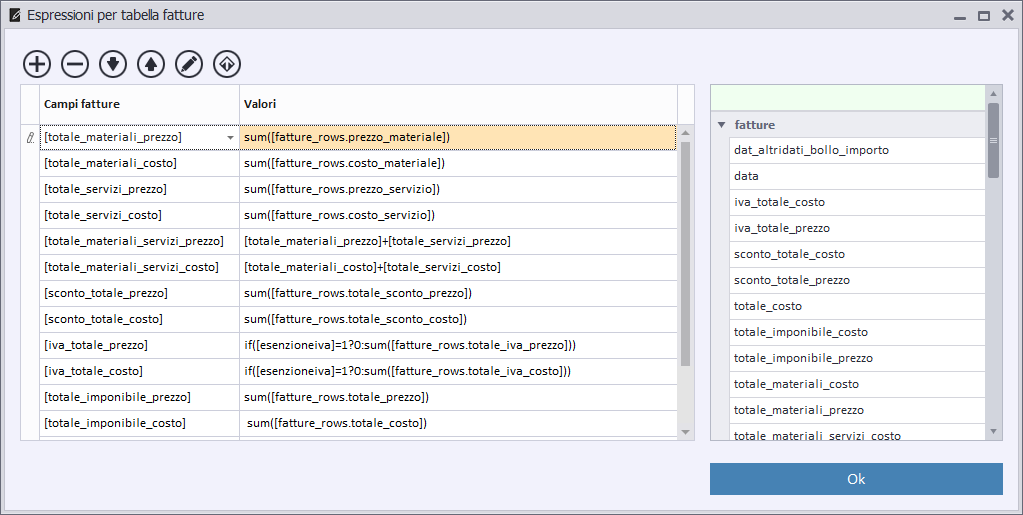
The left column shows the field where the result of the expression is saved. The central column (Values) is where the actual expression is written. The panel on the right contains all the fields of the table and of the additional tables that can be used in expressions.
Fields are always enclosed in square brackets [].
If a field is enclosed in curly braces {}, it means the field is not in the table but belongs to the parent table (so not an additional table).
Calculation expression examples
[totale_prezzo] = [totale_vendita] – [sconto_totale]The expression sets the field [totale_prezzo] by subtracting [sconto_totale] from [totale_vendita].
[tempo_produzione] = ([qta_richiesta] * [ore_lavoro]) / [numero_macchine]The expression shows how to write a calculation with round brackets.
[totale_prezzo] = [totale_vendita] – ([totale_vendita] / 100) * [sconto_percentuale]The expression sets [totale_prezzo] by calculating a percentage discount on the sales total.
[totale_prezzo] = sum([fatture_rows.totale_prezzo])The value is the sum of the [totale_prezzo] column in the fatture_rows table. The SUM function can only be used from the record towards the additional table, not the other way round. The reason is that the record cannot access a single value on a specific row of the additional table (fatture_rows), so it can only request a single value, in this case the sum of the column.
[totale_prezzo_lordo] = sum([fatture_rows.totale_prezzo])
[totale_prezzo_netto] = [totale_prezzo_lordo] – ([totale_prezzo_lordo] / 100) * [sconto_percentuale]
First a partial value is set to show the gross total in [totale_prezzo_lordo]. That value is then used to calculate the net value.
[totale_riga_lorda] = [prezzo_singolo_riga] * [Quantità]
[totale_riga_netta] = [totale_riga_lorda] – ([totale_riga_lorda] / 100) * {sconto_cliente}
Here the expressions are in the row of the additional table. The field {sconto_cliente}, written in curly braces, tells the program that the value isn’t on the row but must be taken from the parent record (if any). So for every row added to the invoice, the program retrieves the discount set in the header. If the customer discount is changed in the invoice, all the existing rows are recalculated with the new value.
[iva_totale] = if([esenzioneiva]=1?0:sum([fatture_rows.iva_totale]))This expression uses a conditional to set a value based on a choice. Before setting [iva_totale], the expression checks the value of the field [esenzioneiva] (VAT exemption). If the field is 1, [iva_totale] is set to 0; otherwise it is set to the sum of the [iva_totale] column in the fatture_rows table.
[totale_giorni] = days([data_fine] : [data_inizio])
[totale_ore] = hours([data_fine] : [data_inizio])
These expressions are used to get the number of hours or days between two dates.