
This page contains all the program’s basic settings.
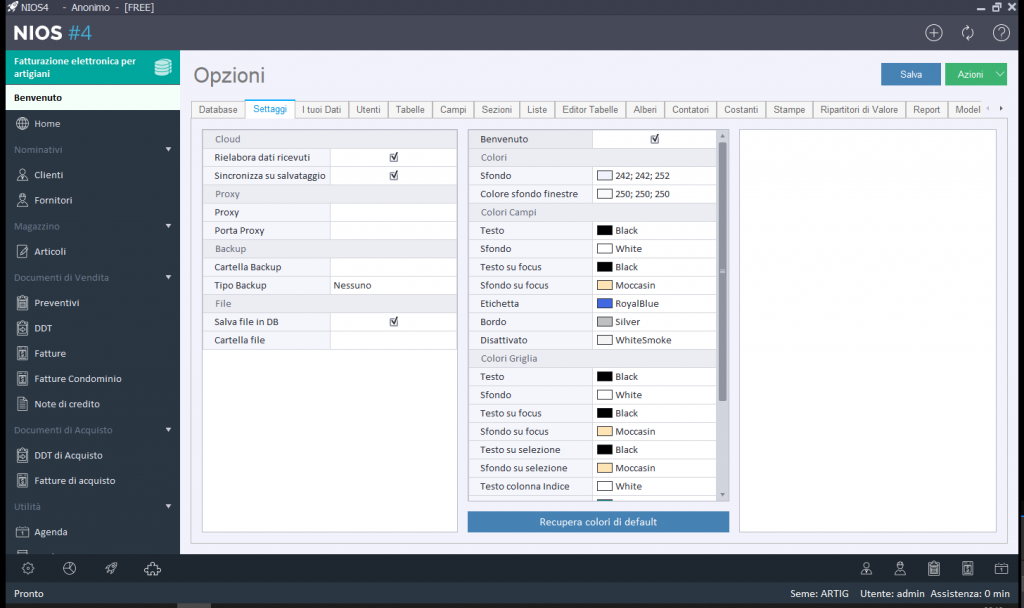
Reprocess received data
If active, data received from the server can be reprocessed and sent back. It is used, for example, to update item stock when a document changes its quantities (if the database is a cloud database).
Sync on save
If active, the program synchronizes a form with the server as soon as it is saved (if the database is a cloud database).
Proxy
Sets the proxy server for internet communication.
Proxy Port
Sets the proxy server port for internet communication.
Backup Folder
Sets the folder where a copy of the database is created (Access databases only).
Backup Type
Sets when the automatic backup is made (Access databases only).
Save files in DB
If set, files are saved inside the database. Remember that Access databases cannot exceed 2 GB.
We recommend enabling this option only if you don't need to store many files.
Download files on Sync
If active, files are downloaded directly during synchronization. If not, files are downloaded only when the user needs to open them. For images, the low-resolution thumbnail is always downloaded automatically.
Download all files
Forces all files to be downloaded to the computer.
Export all files
Exports all files, saving them in folders organized by table and record.
Files folder
If files aren't stored in the database, you need to specify the folder where they will be saved.
Remember that the files are encrypted and can therefore only be opened from the program.
Currency
Changes the currency symbol in bulk in all currency fields.
Download Beta
If active, the program also downloads versions still in beta, besides the official ones.