
Skip to content
No results
  • .NET libraries
  • Account data management
  • Advanced scripting system
  • Alphanumeric fields
  • Archives option
  • Backup
  • Build your own management software
  • Button field
  • Calendar section
  • Check field
  • Check list field
  • Cloud Log option
  • Color field
  • Common field parameters
  • Complete API for communicating with the Nios4 cloud
  • Connecting to other management systems
  • Constants option
  • Counters option
  • Currency field
  • Daemon service
  • Dashboard section
  • Dashboard Widget: Bar chart
  • Dashboard Widget: Buttons
  • Dashboard Widget: Chart
  • Dashboard Widget: Indicator
  • Dashboard Widget: Pie chart
  • Dashboard Widget: Summary table
  • Dashboard Widget: Table
  • Dashboard Widget: Target value
  • Data exchange services between management systems
  • Data forms
  • Data importers option
  • Data synchronization
  • Database
  • Date field
  • Decimal number field
  • Document status field
  • Email field
  • Email Templates option
  • Fields
  • File field
  • File fields
  • First installation
  • First steps
  • Gallery section
  • Geographic position field
  • Global counter field
  • Image field
  • Installation
  • Integer number field
  • Interface
  • Let’s add calculations
  • Let’s arrange the fields
  • Let’s create records and documents
  • Let’s create the base
  • Let’s create the main tables
  • Let’s create the print layout
  • Let’s create the sections
  • Let’s link the tables
  • Licenses
  • Link field
  • List field
  • List fields
  • Lists option
  • Login
  • LUA example: Block saving an order
  • LUA example: Change the currency of all fields
  • LUA example: Check our GPS position
  • LUA example: Create a cost history for items
  • LUA example: Create a script report
  • LUA example: Create an invoice from appointments
  • LUA example: Create customers from service reports
  • LUA example: Create monthly summaries from operators’ timesheets
  • LUA example: Empty a table completely
  • LUA example: Export to an XML file
  • LUA example: Group a customer’s orders into one invoice
  • LUA example: Import an XML file
  • LUA example: Print several orders together
  • LUA example: Read and write an additional table
  • LUA example: Update bill of materials prices
  • LUA example: Update the bank account from the payment due date to the invoice
  • LUA example: Update the customer name in documents
  • LUA example: Use a barcode reader in a Windows document
  • LUA language
  • LUA object: database
  • LUA object: datafield
  • LUA object: dataform
  • LUA object: datarow
  • LUA object: datatable
  • LUA object: dataview
  • LUA object: document
  • LUA object: email
  • LUA object: errorn
  • LUA object: fileinfo
  • LUA object: notification
  • LUA object: output
  • LUA object: program
  • LUA object: subscript
  • LUA object: tableview
  • LUA object: utility
  • LUA object: xmlattribute
  • LUA object: xmldocument
  • LUA object: xmlelement
  • LUA objects
  • LUA script examples
  • Main elements
  • Map section
  • Nios4 Developer English
  • Notes field
  • Numeric fields
  • Options
  • Percentage field
  • Permissions
  • Phone field
  • Platform basics
  • Prints
  • Prints: Basic functions
  • Prints: File menu
  • Prints: SQL strings
  • Ready for the Internet of Things
  • Record and Document section
  • Reports
  • Script Report
  • Script Report: Interface
  • Script Report: Processing
  • Script Report: Row
  • Sections
  • Sensitive data encryption
  • Separator field
  • Settings option
  • Signature field
  • Special fields
  • SQL option
  • Status list field
  • Subtable field
  • Subtable Values Report
  • Subtable Values Report (STAB)
  • Sum Value Report (STAB)
  • Sum values report
  • Table editor option
  • Table layouts
  • Table Parameter: Accessory table
  • Table Parameter: Additional Tables
  • Table Parameter: Barcode reading
  • Table Parameter: Bulk modifiers
  • Table Parameter: Calculation expressions
  • Table Parameter: Comments table
  • Table Parameter: Derived records
  • Table Parameter: Document Aggregator
  • Table Parameter: Duplicable to
  • Table Parameter: Grid formatting
  • Table Parameter: Grid row height
  • Table Parameter: Read triggers
  • Table Parameter: Reminder Templates
  • Table Parameter: Reminders
  • Table Parameter: Sort and Search Fields
  • Table Parameter: Subtitle fields
  • Table Parameter: Title fields
  • Table Parameter: Type
  • Table Parameter: Value field
  • Table Parameter: Value splitters
  • Table Parameter: Write triggers
  • Table parameters
  • Table section
  • Table Values Report
  • Table Values Report (STAB)
  • Tables
  • Text field
  • Tree field
  • Trees option
  • Trigger Sync service
  • User list field
  • Users
  • Value splitter field
  • Value splitters option
  • View section
  • Web API
  • Web API: action
  • Web API: database_list (get)
  • Web API: model (get) (post)
  • Web API: sync (get)
  • Web API: table_info (get)
  • Web API: table_list (get)
  • Web API: table_save (post)
  • Web API: user_login (get)
  • Web API: user_logout (get)
  • Web API: users (get)
  • White label
  • Your data option
Developer Nios4
Developer Nios4
Developer Nios4
Developer Nios4

Table Parameter: Value splitters

Value splitters automatically fill in an additional table with values taken from the form and split according to time and percentage criteria.

Splitters are selected from a dedicated field that must be created in the table. This lets you choose which splitter to use for the calculations.
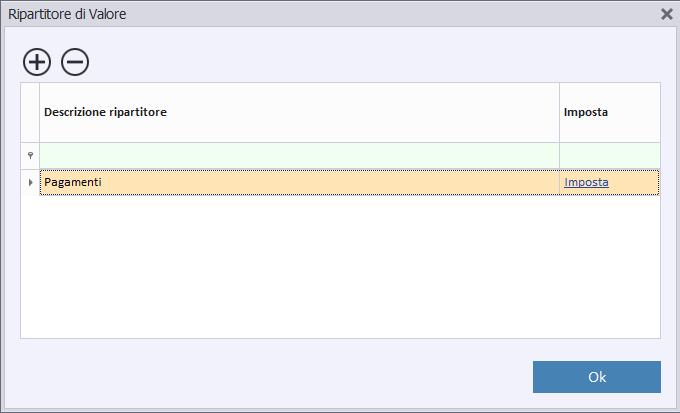
Value splitters settings

You can create several value splitters in the management window. Each splitter adds its own page to the data form.

Splitter page in the data form
  • Nios4 Developer English
    • Build your own management software
    • Advanced scripting system
    • Complete API for communicating with the Nios4 cloud
    • Data exchange services between management systems
    • Ready for the Internet of Things
    • White label
  • First steps
    • First installation
    • Let’s create the base
    • Let’s create the main tables
    • Let’s create the sections
    • Let’s create records and documents
    • Let’s link the tables
    • Let’s arrange the fields
    • Let’s add calculations
    • Let’s create the print layout
  • Platform basics
    • Installation
    • Login
    • Interface
    • Database
    • Data synchronization
    • Permissions
    • Users
    • Data forms
    • Licenses
    • Backup
    • Account data management
  • Main elements
    • Tables
      • Table layouts
      • Table parameters
    • Fields
      • Common field parameters
      • Sensitive data encryption
      • List fields
      • Numeric fields
      • Alphanumeric fields
      • File fields
      • Special fields
    • Sections
    • Options
    • Reports
    • Prints
  • LUA language
    • LUA objects
    • LUA script examples
  • Web API
  • Daemon service
    • Connecting to other management systems
  • Trigger Sync service
  • .NET libraries
Copyright © 2026 - WordPress Theme by CreativeThemes